
Free HTTPS (SSL) link for your web app, no domain needed
No domain? Open your website, API or bot dashboard over HTTPS with a free SSL certificate from Endercloud. Port first, a dash, then your node name, always on ender.co.in, like https://25808-agni.ender.co.in.
- Difficulty:
- Beginner
- Time:
- 2 minutes
On this page
Don't have a domain yet? You can still open your website, API or bot dashboard on HTTPS with a free SSL certificate from Endercloud. Write the port first, then a dash, then your node name, on ender.co.in, and open it with https://. For example, agni.endercloud.in:25808 becomes https://25808-agni.ender.co.in.
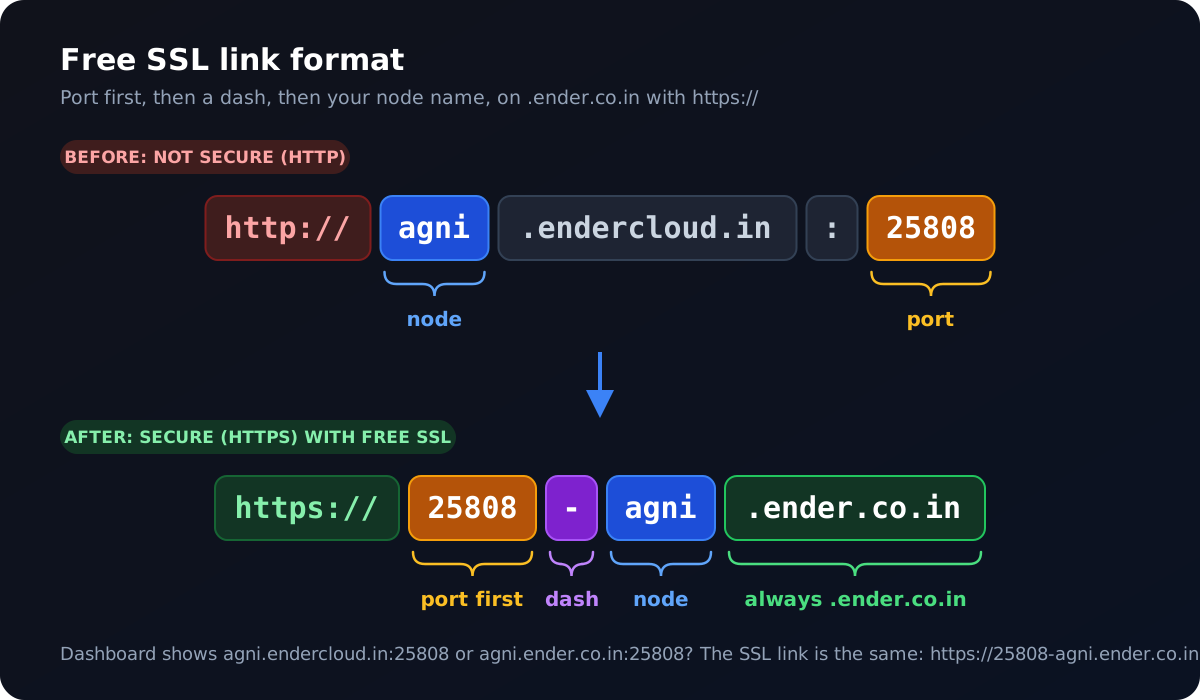
.ender.co.in.Why your normal address says "Not secure"
Your server address looks like agni.endercloud.in:25808. (or agni.ender.co.in:25808 on newer nodes). Opened in a browser, it becomes http://agni.endercloud.in:25808. That is a plain HTTP connection, so there is no SSL: browsers show a Not secure warning, and some services (Discord OAuth logins, webhooks, payment callbacks) refuse plain HTTP links.
The free SSL link fixes this. It gives the same app a secure https:// address, and Endercloud provides the SSL certificate for free.
The format
Depending on your node, the address on your server's dashboard ends in .endercloud.in (older nodes) or .ender.co.in (newer nodes). Both work the same way, so you don't need to worry about which one you have. You only need two parts of it:
Node: the first word of the address. In
agni.endercloud.in:25808oragni.ender.co.in:25808the node isagni.Port: the number after the colon. In both examples the port is
25808.
Put them together like this. The SSL link is always on ender.co.in, whichever address your dashboard shows:
https://[port]-[node].ender.co.inAddress on your dashboard | Normal link (no SSL) | Free SSL link |
|---|---|---|
|
|
|
|
|
|
|
|
|
Remember the order: the port comes first, then a dash (-), then the node. There is no colon and no port number at the end, and the SSL link always ends in .ender.co.in.
How to use it
Open your server in the Game Panel and copy the address shown in the header (it is also on the Network tab). For example
agni.endercloud.in:25808oragni.ender.co.in:25808.Make sure your app is running (check the Console) and listens on that port on all interfaces (
0.0.0.0), not onlylocalhost.Write the link as
https://+ port +-+ node +.ender.co.in. For the example:https://25808-agni.ender.co.in.Open it in your browser. You should see your app with the padlock, on a secure HTTPS connection.
Your app keeps serving normal HTTP on its port. The secure HTTPS connection and the free SSL certificate are handled by Endercloud, so you don't need to set up a certificate in your code.
What it is for
Use it for anything that opens in a browser or is called over HTTP: websites, APIs, bot dashboards, web panels and webhook endpoints, for example Node.js (Express) or Python (Flask, FastAPI) apps on bot hosting.
It is not for game connections. Players join a Minecraft or Hytale server with the normal address and port; see Free subdomain and dedicated IP for a nicer Minecraft address.
Want your own domain instead?
When you're ready for a branded address like https://dashboard.yourdomain.com, link your own domain with Server Linked Domains. It also comes with a free SSL certificate. See Link a domain with free HTTPS to your website or web app.
Frequently asked questions
Do I need to buy a domain or an SSL certificate?
No. The free SSL link works without a domain, and the SSL certificate is free from Endercloud.
My server address is agni.endercloud.in:25808. What is my SSL link?
Put the port first, then a dash, then the node: https://25808-agni.ender.co.in. Use your own port and node name from the Game Panel.
The SSL link shows an error or a blank page
Check that the app is running in the Console and that it opens at the normal http:// address first. Most problems come from an app listening only on localhost, or on a different port from the one in the panel. Also check the order: port first, then dash, then node.
Can I use this link for Discord OAuth redirects or webhooks?
Yes. It is a normal https:// address, so you can use it as a redirect URL or webhook URL. Add the full path your app expects, for example https://25808-agni.ender.co.in/callback.
Still stuck? Open a ticket with your server address and the link you tried, and our team will help.
Was this article helpful?
Related articles
Use the host and port shown in the Game Panel with the admin username and password you chose at checkout. Connection strings for MongoDB, MariaDB, PostgreSQL and Redis.
Switch your bot from one language to another with Settings → Change Egg, and change the Node.js, Python or Java version with the Docker Image list in Startup.
The LavaLink V4 plan gives you your own Lavalink server that you configure yourself: set the password in Startup, adjust application.yml, then add host, port and password to your bot.
Most bots go offline because the code crashes, runs out of memory, uses an invalid token or missing intents, hits Discord rate limits, or the service is suspended for an unpaid invoice.
